Yellowdig Engagement Toolkit
Using Yellowdig to Build Conversation and Community
What Is Yellowdig?
Yellowdig is a social learning platform designed to build authentic community and engagement in your courses.
Unlike traditional discussion boards, Yellowdig works more like a social network — students post, comment, react, and share resources in real time. It helps learners connect with one another, explore ideas organically, and take ownership of their learning experience.
Through Yellowdig, students:
Engage in conversation, not just Q&A
Build connection and belonging
Practice professional communication and critical thinking
Earn participation points through meaningful interaction

How is Yellowdig Different from a Traditional Discussion Board?
Traditional discussion boards often feel like a chore—students post because they have to, not because they want to.
Yellowdig changes that.
Here’s how:
Social, Not Static: Posts appear in an engaging feed format, allowing for real-time interaction and multimedia sharing (videos, links, images, etc.).
Gamified Participation: Points and badges motivate learners to contribute meaningfully and consistently.
Organic Conversation: Instead of rigid prompts and reply requirements, Yellowdig encourages spontaneous, learner-driven discussions that evolve naturally.
Community Building: Learners connect around shared interests, creating a more vibrant, supportive online environment.
Instructor Insight: Built-in analytics show trends in participation and sentiment, helping educators guide and improve engagement.
In short, Yellowdig turns passive discussion into active learning.
Moving Beyond Mandatory Prompts
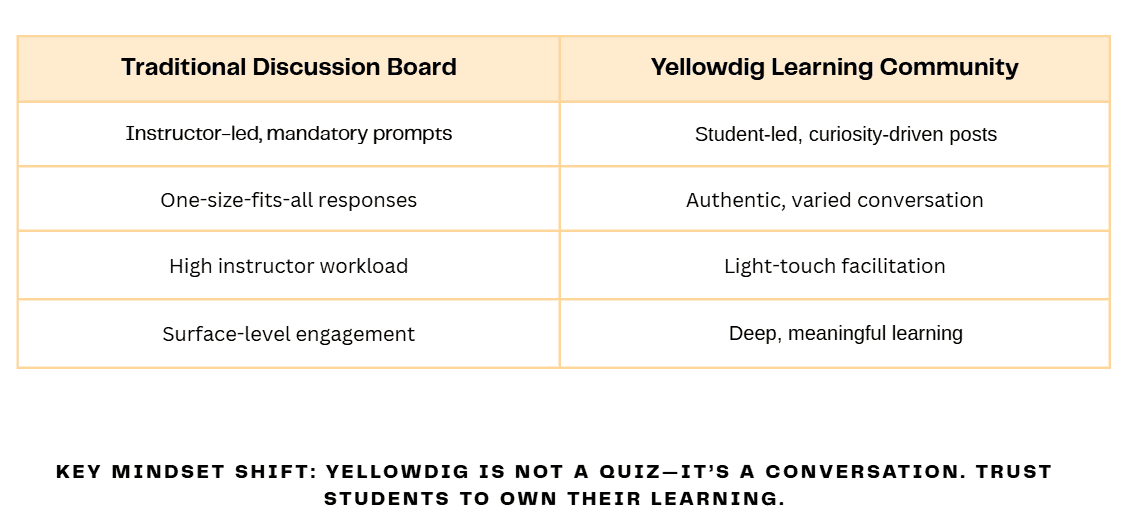
In traditional discussion boards, participation is often driven by weekly prompts and required replies. While these can ensure activity, they rarely spark genuine curiosity or conversation. Yellowdig takes a different approach — it eliminates mandatory prompts in favor of open, learner-driven discussion.
Instead of responding to a single question, learners share what they’re discovering, connect course concepts to real-world experiences, and engage with their peers’ ideas. This shift empowers students to take ownership of their learning and encourages authentic dialogue rather than formulaic posts.
Instructors still provide guidance by highlighting themes, sharing insights, or asking thought-provoking questions, but the flow of conversation remains organic and student-centered. The result is a more engaging, dynamic community where learning feels natural — not forced.
Using Topic Tags to Guide and Connect Conversations
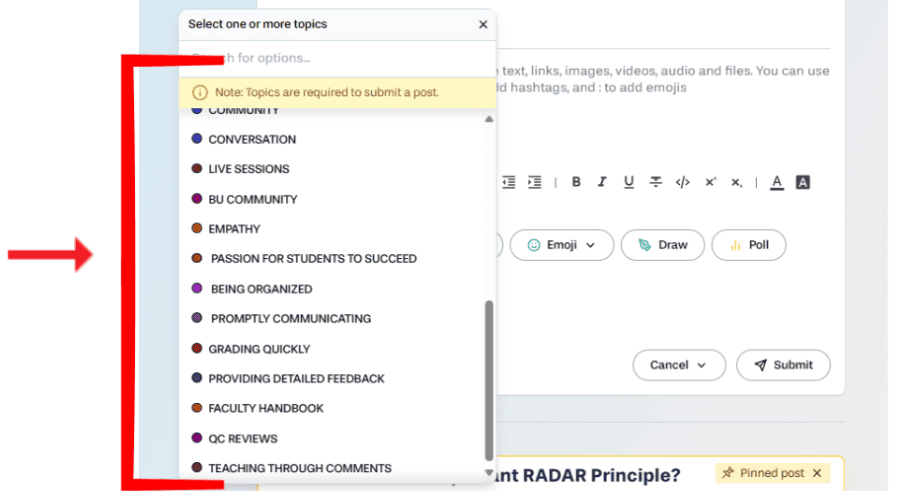
Topic tags in Yellowdig help organize discussions and connect ideas across the learning community. Instead of dividing conversations by week or assignment, tags make it easy for learners to explore themes, subjects, or skills that matter most to them.
How to Use Topic Tags Effectively:
Be Intentional: Create tags that align with key course themes, learning objectives, or big ideas (e.g., Leadership, Sustainability, Ethics in Technology).
Encourage Learner Input: Allow students to add or suggest tags, helping the community define what’s relevant and interesting to them.
Use Tags to Connect Concepts: Tags make it simple to trace ideas across multiple discussions, creating a living map of shared learning.
Why Not Use “Week 1,” “Week 2,” and So On:
Labeling tags by week turns discussions into short-lived, time-bound tasks — the very problem Yellowdig is designed to solve. When posts are locked into weekly silos, conversations end as soon as the calendar moves forward.
By using conceptual or thematic tags instead, you keep ideas alive throughout the course. Learners can revisit, expand, and connect discussions from earlier in the term, building a continuous dialogue rather than a series of disconnected posts.
Why You Might Choose to Disable Topic Tags
There may be times when you intentionally choose to disable topic tags — particularly when your goal is to create open, community-building conversations that aren’t tied to specific course themes or outcomes.
Disabling topic tags can help create a space where students feel free to share ideas, experiences, and personal reflections without worrying about whether their post “fits” a specific topic or affects their grade. These discussions are intentionally non–point-bearing, and in Yellowdig, non–point-bearing posts are not colored in, making it easy for students to see at a glance that these conversations are low-stakes.
Faculty Expectations
In Yellowdig, faculty are community leaders, not just moderators. Your presence, tone, and curiosity set the standard for the learning community. Each week, you’ll guide discussion in two key ways: through Sparks and Engagement.
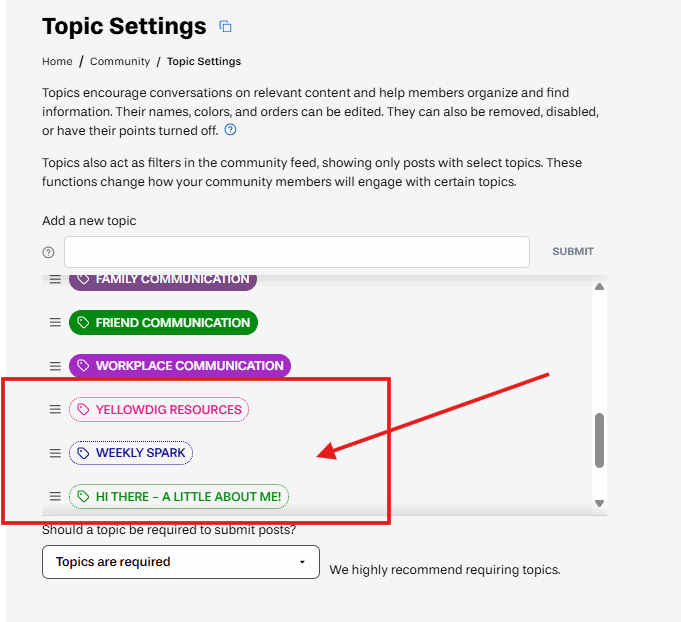
Every week, you’ll create one Spark to launch the conversation. The purpose is to ignite discussion, connect learning to real-world contexts, and model curiosity for your students.
Requirements:
Post one Spark each week.
Pin your Spark to the top of the board on Sunday or Monday to set the tone for the week.
Keep it short, engaging, and curiosity-driven.
Avoid turning Sparks into “mini-assignments” — think conversation starter, not graded prompt.
Teaching in Yellowdig happens through your comments. Faculty engagement throughout the week helps sustain momentum, guide discussion, and model academic discourse.
Requirements:
Engage with at least 50% of students each week through comments.
Respond in ways that deepen thinking and connection, not just acknowledge participation.
Be present consistently — spread comments across several days rather than posting all at once.
Creating Effective Sparks
What is A Spark?
Sparks are short, engaging posts that ignite conversation and build community. Faculty are expected to create one Spark per week and pin it at the start of the week to set the tone.
Check out different approaches to creating Sparks below!
Click each section to explore strategies, examples, and tips for engaging your students with both WRAP and non-WRAP Sparks, plus ways to use AI if you need a little inspiration.
APPROACH #1: THE WRAP METHOD
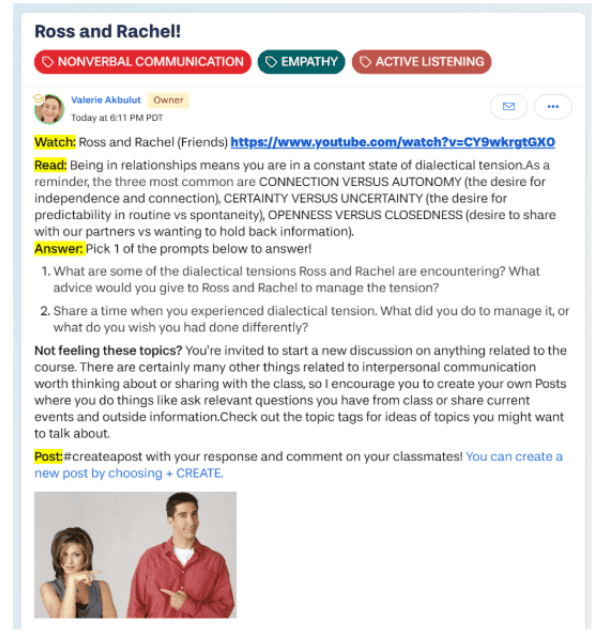
Developed by Dr. Barbara Ward, the WRAP method helps create interactive, meaningful online conversations. WRAP provides clear prompts and guidance through Watch, Read, Answer, and Post, giving students a structured path to engage. Participation in these prompts, however, is always optional, allowing learners to interact in the way that works best for them. This balance keeps Sparks focused, encourages authentic conversation, and fosters a strong learning community.
What it is:
Start with a short video to introduce or expand on a topic.
Tips:
Keep it short and engaging — aim for 90 seconds to 2.5 minutes.
(Up to 5 minutes only if it’s truly worth it!)Choose something relevant, interesting, or thought-provoking.
Videos can come from YouTube, TED-Ed, or ones you make yourself.
The goal: Add value, not overwhelm.
What it is:
Provide a short reading or resource to deepen understanding.
Tips:
Keep it short — avoid long articles or dense academic texts.
Use an article excerpt, infographic, or website that connects to the topic.
Or write your own short commentary (1–2 paragraphs).
What it is:
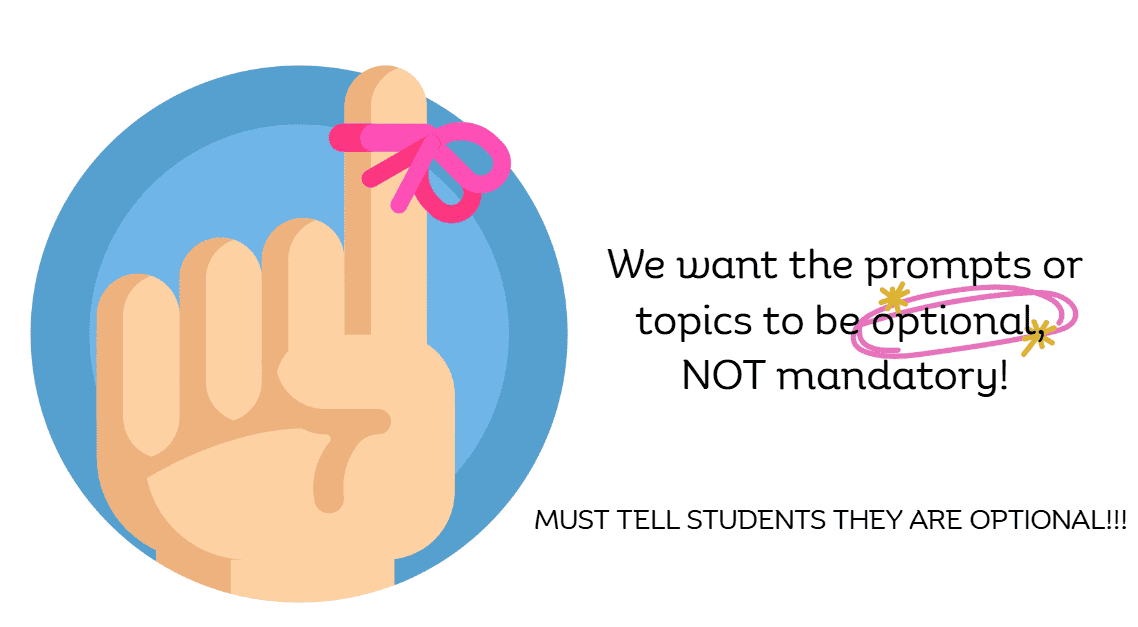
Invite students to respond — but keep it optional, not mandatory.
Why optional?
It reduces pressure and encourages genuine engagement.
Prompt ideas:
Ask for opinions: “Do you agree or disagree with the author’s view?”
Ask what they know: “What do you already know or want to learn about this topic?”
Make it personal: “How does this relate to your work or life?”
Offer choices: Provide a list of discussion topics and let them choose.
Reminders:
Always encourage civil discourse — be polite, respectful, and professional.
If a post is inappropriate: Flag it (don’t delete it) and alert your program director.
.
What it is:
Encourage students to engage in conversation — by creating their own post or commenting on others.
Tips:
Some will prefer to create posts; others will comment and reply.
Both count as engagement!The key is interaction and community building, not perfection.
Remind students to stay active — “post, connect, and converse.”
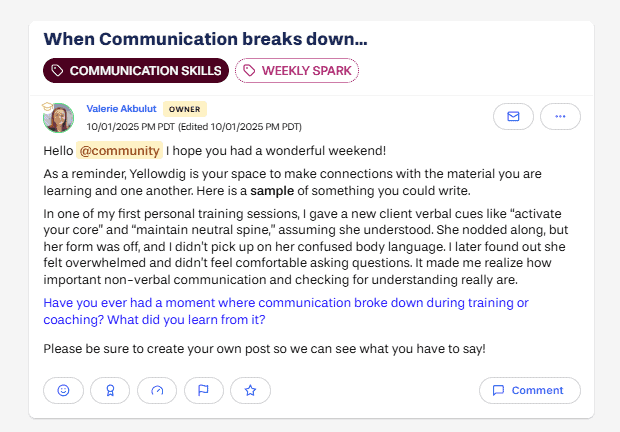
Check out this sample Spark to see the WRAP method in practice. Notice how the words Watch, Read, Answer, Post guide students, and how the prompts are optional, giving learners the freedom to engage in the way that works best for them. This example highlights how a short, focused Spark can spark meaningful conversation and community.
APPROACH #2: NON-WRAP SPARKS
Non-WRAP Sparks are flexible, open-ended posts designed to encourage curiosity and student-led conversation. Unlike WRAP, there’s no rigid structure—students decide how they want to engage. Sparks can either offer optional prompts to guide conversation or provide a list of topic tags for students to explore what interests them. Both approaches give learners the freedom to start conversations, share perspectives, and build community in ways that feel meaningful to them.
What it is:
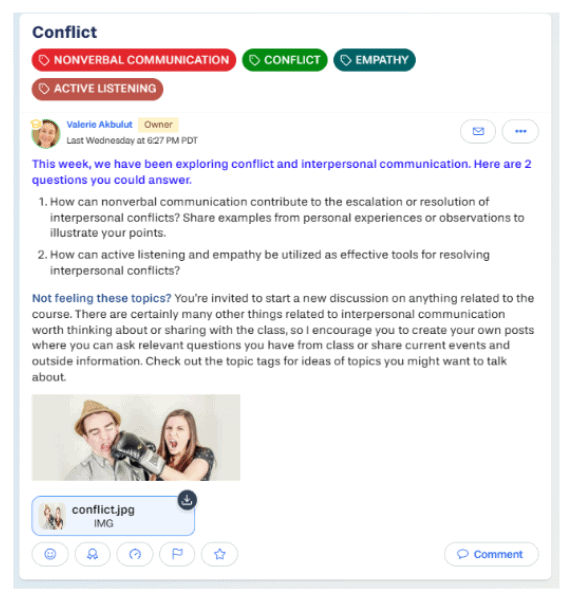
Provide a few thoughtful, optional prompts to guide conversation, but let students choose how (or if) they respond.
Tips:
Participation is optional — students can respond to any, all, or none of the prompts.
Prompts give structure without making engagement mandatory.
Encourage interaction — students can create posts or comment on others.
Focus on building community and conversation, not getting the “right answer.”
What it is:
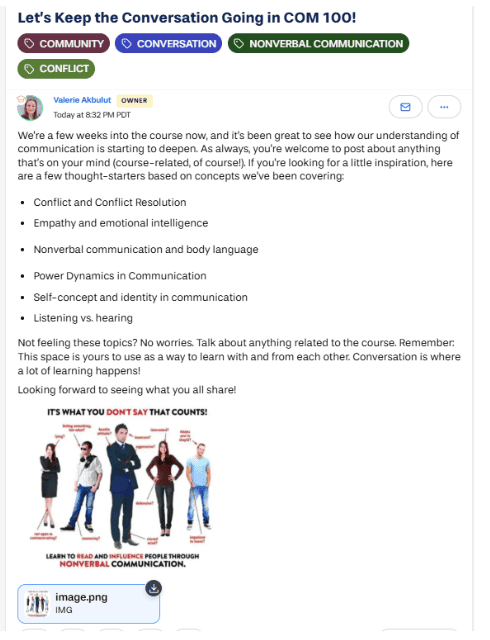
Provide a pre-created list of topic tags in Yellowdig that align with your specific course content and invite students to start conversations on what interests them.
Tips:
Students choose tags and decide which conversations to join — posting and commenting is optional.
Tags guide discussion while giving learners ownership of the conversation.
Encourage interaction — students can create posts or comment on others.
Focus on connection and community building, not perfection.
Make sure your topic tags reflect key themes, units, or skills from your course to keep conversations relevant.
How to Use AI to Generate Optional Prompts
If you’re ever feeling stuck on how to craft engaging, open-ended discussion questions, AI can be a helpful tool. By leveraging your course’s learning objectives, AI can quickly generate thoughtful prompts designed to inspire meaningful student conversations. Below is a simple, effective process to create and refine these questions—while keeping them clear, relevant, and optional for your students.
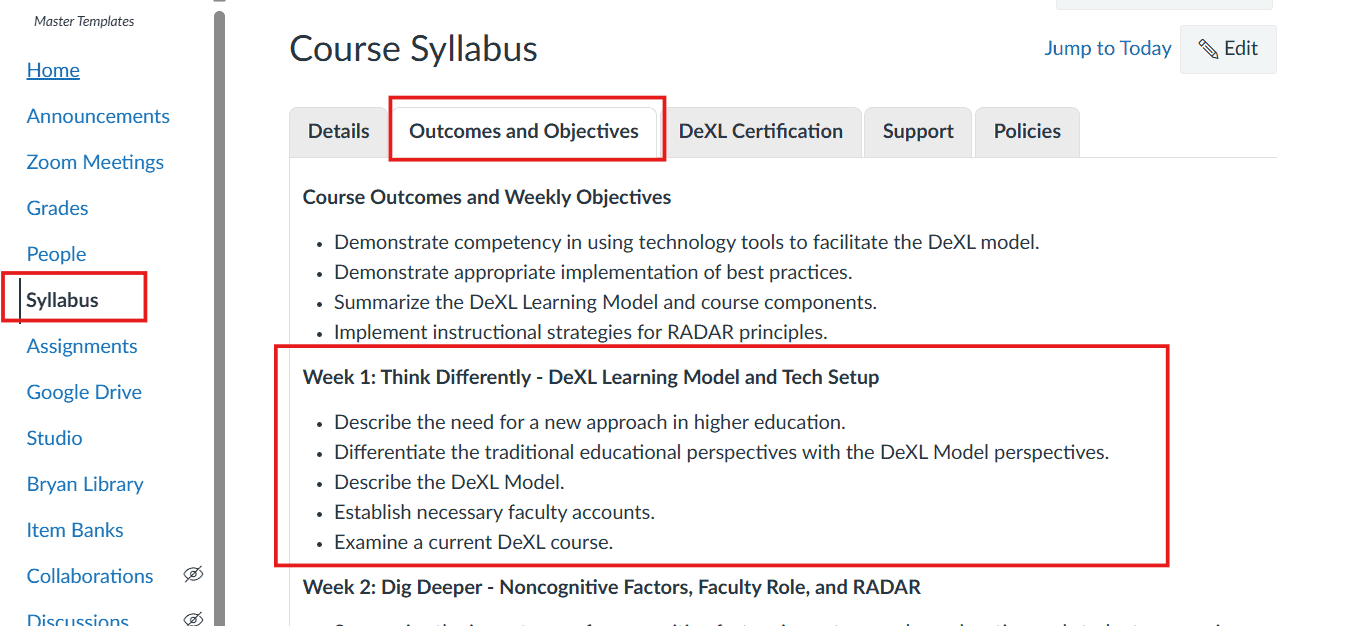
To get objectives, go to the syllabus and select outcomes and objectives. Then select the learning objectives for the week you want.
Step-by-step:
Copy and paste your weekly learning objectives into your AI tool.
Use this prompt for AI:
Using the following learning objectives, create a list of 5 open-ended questions with no right or wrong answer for discussion for a [insert course level, e.g., 100-level] [insert program] that focuses on [insert topic].
Review the questions AI generates:
Are they clear and easy to understand?
Are they open-ended enough to spark deep discussion and critical thinking?
If any questions feel too vague or complex, ask AI to revise using this prompt:
Please tweak this question to make it clearer and more open-ended.
Customize the final questions as needed to fit your course and students.
Teaching Through Comments

Teaching through comments means actively engaging with students’ posts by asking questions, offering feedback, and encouraging deeper thinking. It helps build a vibrant learning community and supports student growth.
Why It Matters
Shows students you’re present and invested
Encourages meaningful discussion
Clarifies concepts and challenges ideas
Models respectful communication
Ways to Teach Through Comments
| Strategy | Description | Example Comment |
|---|---|---|
| Play Devil’s Advocate | Challenge assumptions respectfully to promote critical thinking. | “Interesting point! How might someone with a different view see this?” |
| Ask Open-Ended Questions | Prompt students to elaborate and reflect. | “Can you give an example from your experience that relates to this?” |
| Share Examples | Provide real-world or course-related examples to clarify ideas. | “I’ve seen this approach work well in [situation]…” |
| Share Resources | Offer articles, videos, or websites for deeper learning. | “Here’s a helpful article if you want to explore this further.” |
| Highlight Key Insights | Acknowledge thoughtful contributions to encourage engagement. | “Great insight connecting this to [concept].” |
| Encourage Peer Interaction | Prompt students to respond to one another to build community. | “What do others think about this perspective?” |

Faculty Tip: Use the Yellowdig Action Center
The Yellowdig Action Center is your go-to dashboard for monitoring engagement, tracking participation trends, and identifying students who might need extra support.
It provides quick insights that help you guide your community without adding more grading or manual tracking.

Copyright 2025 | Bryan University | 350 West Washington Street, Tempe, AZ 85281
Copyright 2025 | Bryan University | 350 West Washington Street, Tempe, AZ 85281