How to Access "MY QC Reviews"

This page shows you where to locate and how to access your Quality Check (QC) reviews. QC reviews provide structured feedback on course setup, engagement, grading, communication, and live session facilitation to support continuous improvement. Use the steps below to view your most recent and past QC reviews, review feedback from your Faculty Success Specialist (FSS), and reflect on recommended next steps for your course.

Steps to Access “My QC Reviews”

Go to: http://tools.bryanuniversity.edu 

Log in using your Bryan University Email address and password

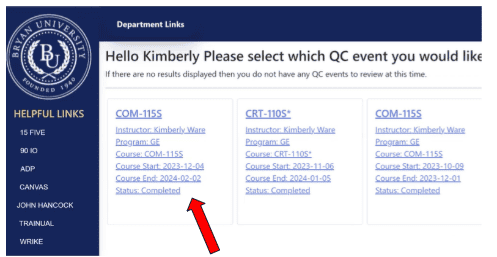
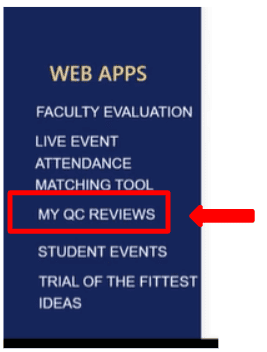
Select My QC Reviews on the left-hand navigation bar.

Select the box of the review you would like to access.  Note: Instructors will only be able to access completed reviews.

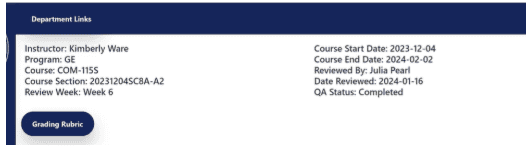
On the top dashboard, the following information is available:

  • Instructor Name
  • Program
  • Course
  • Course Section
  • Review Week
  • Course Start date
  • Course End date
  • Reviewed by
  • Date Reviewed
  • QA status

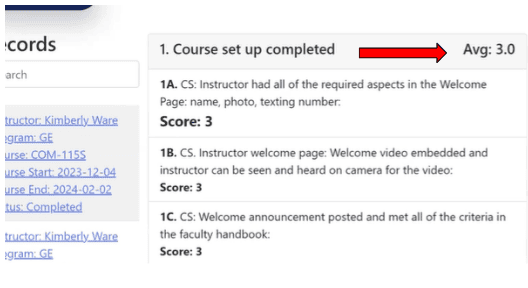
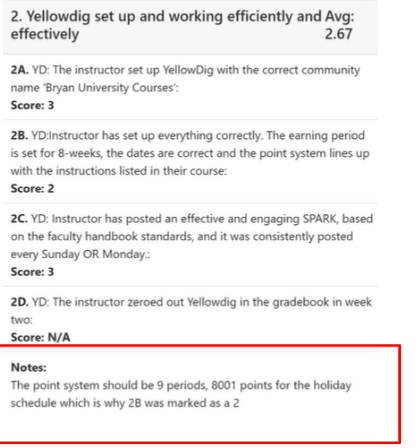
There are 6 sections: Course Setup, Yellowdig, Managing Gradebook, Substantive Instructor Feedback, Instructor Communication, and Live Sessions. 

The Average Score for each section is located at the top of each section. Note: The highest score possible is a 3.0

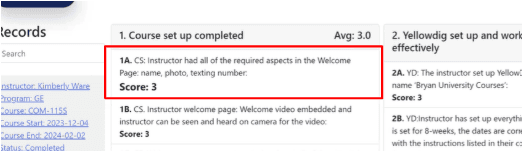
Questions and Scores can be located in each Section.  Note: Use the Grading Rubric to understand the scoring guide.

Notes from the Faculty Success Specialist will be located at the bottom of each section. Note: No notes will be left if you receive a score of 3.

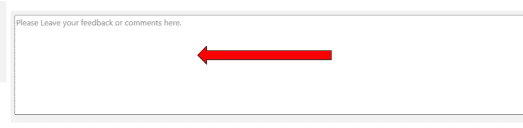
To leave comments or feedback, use the box at the bottom of the review.

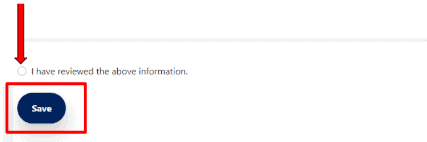
Select “I have reviewed the above information” and select SAVE.

Copyright 2025 | Bryan University | 350 West Washington Street, Tempe, AZ 85281

BRYAN UNIVERSITY LOGO SEAL

Copyright 2025 | Bryan University | 350 West Washington Street, Tempe, AZ 85281