Writing Clear Announcements Students Actually Read

Faculty often rely on announcements as their main way to communicate with students. When announcements are clear, structured, and supportive, students are more likely to read them—and act on them. Use the tips below to make your announcements more effective right away.

Why Announcements Matter

  • They create instructor presence in your course
  • Students often skim—so clarity is critical
  • Clear announcements reduce confusion and repeated questions
  • Strong announcements can increase student engagement

💡 Quick Reflection: Think about your last announcement—did students actually do what you asked?

Illustration of hands typing on a laptop with a smartphone and plant nearby, emphasizing effective communication for student engagement.

What to Include (and What to Skip)

✅ Include:

  • Action items (what students need to do)
  • Deadlines (specific dates)
  • Links/resources (direct access helps)
  • Important updates or clarifications
  • Short videos – like mini lessons or assignment walk-throughs to explain complex tasks

🚫 Skip:

  • Long paragraphs
  • Too much info
  • No clear action
  • Repeating the full syllabus
  • Too many unrelated topics in one message
  • Long or unfocused videos without a clear purpose

Format for Readability (Make It Easy to Scan)

Students don’t read announcements word-for-word—they scan them.

✅Do this:

  • Use bold text for key actions or deadlines
  • Break content into bullet points
  • Keep text concise and easy to scan (use short chunks instead of long paragraphs)
  • Add direct links to assignments or resources
  • If using video, embed it directly


📌 Not sure how to create quick videos? Check out the Video for Teaching Presence resource page for simple ideas like mini lessons and assignment walk-throughs.
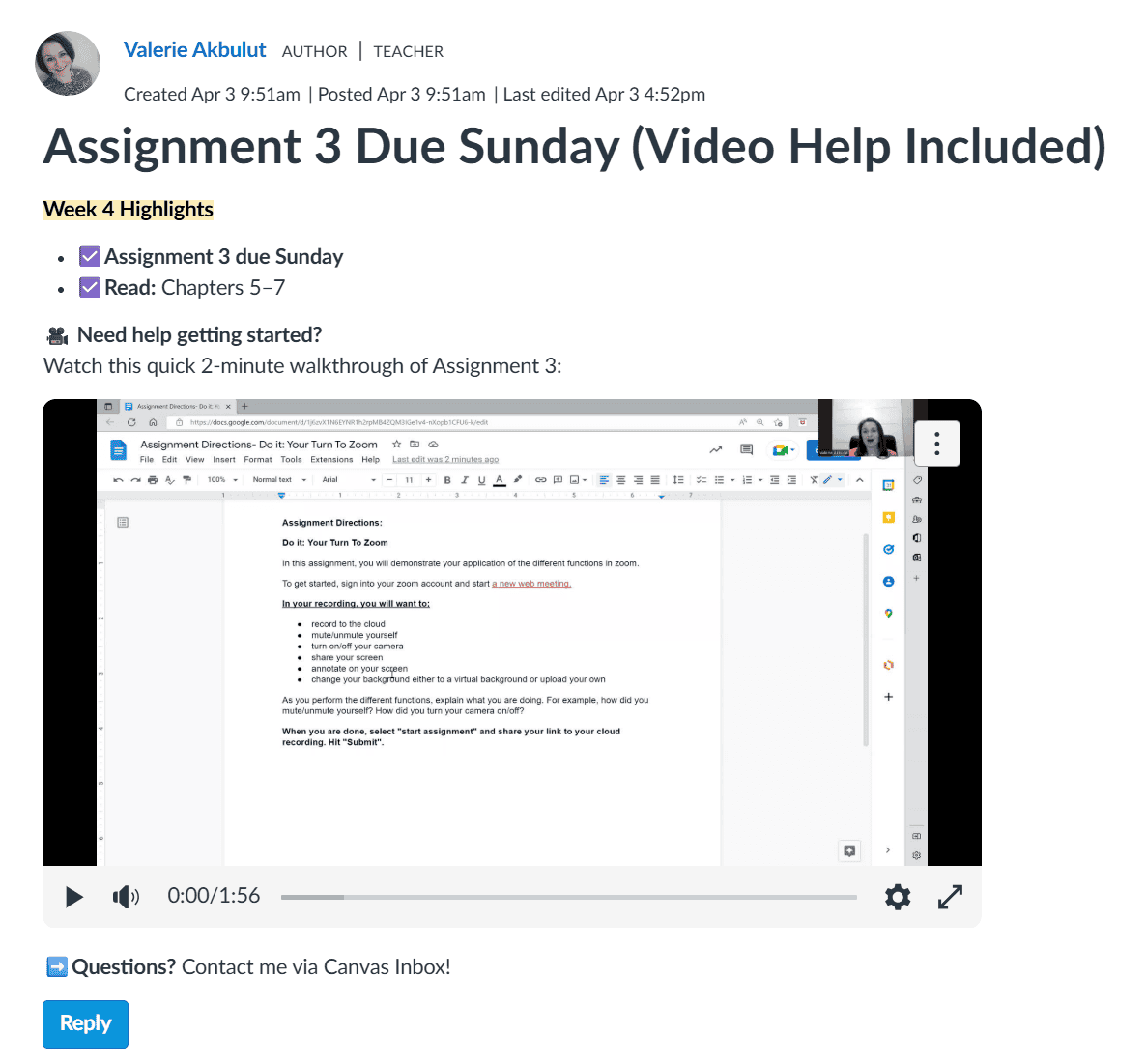
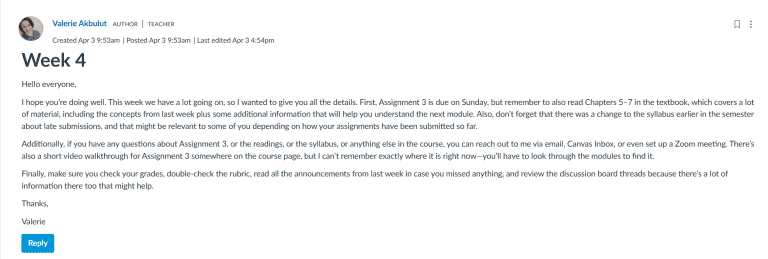
Screenshot of assignment instructions for students on creating clear, effective announcements in an online learning platform.

❌What’s wrong here (why students won’t engage):

  • Long, dense paragraph – almost impossible to scan
  • Too many topics at once – Assignment, readings, syllabus, videos, grades, discussion boards
  • Unclear next steps – students don’t know what to do first
  • Unfriendly tone – wordy, confusing, lacks focus
  • Video is buried – hard to find, doesn’t feel actionable
Students reading a clear, well-structured announcement on a computer screen, emphasizing effective communication in educational settings.

Use Visuals to Grab Attention

Students respond well to announcements that include visuals—like photos, graphics, GIFs, or memes—because they break up text, highlight key points, and make the message feel approachable.

Do this:

  • Include relevant images or icons to illustrate action items or deadlines.
  • Use memes or GIFs sparingly to emphasize tone or lighten the message.
  • Embed screenshots for instructions or examples when explaining assignments.
  • Keep visuals simple and purposeful—they should clarify, not distract.

🚫Avoid:

  • Overloading announcements with too many images or unrelated visuals.
  • Using visuals that could confuse students or make the message feel unprofessional.

💡 Quick Reflection: Does your announcement use visuals to make key points easier to understand? Even one well-placed image can increase engagement and comprehension.

Write Supportive, Clear Announcements

A friendly, clear tone helps students understand what to do without feeling scolded or overwhelmed. Use the tabs below to see concrete ways to make your announcements approachable, actionable, and easy to read.

Goal: Make students feel welcomed and noticed.

Content:
A short, friendly greeting sets the tone and signals presence. Even a simple line like “Hi everyone” can make a difference. Try to match the greeting to the day or week:

  • “Hi everyone,”
  • “Hello class,”
  • “Happy Monday—hope your week is off to a good start!”
  • “Welcome to Week 4!”


💡 Tip: A tiny greeting makes announcements feel personal rather than robotic.

Goal: Clearly communicate the main action or deadline.

Content:
State exactly what students need to do, and by when. Keep it simple and action-oriented.

✅ Examples:

  • “Complete Assignment 3 by Sunday to stay on track.”
  • “You can submit Assignment 3 anytime before Sunday—let me know if you have questions.”


❌ Avoid:

  • “Don’t forget to submit Assignment 3 or you’ll fall behind.”
  • “It’s important to remember that Assignment 3 is due, so try not to miss it.”


💡 Tip: Use bold or bullets to highlight key actions.

Goal: Motivate students instead of scaring them.

Content:
Frame reminders as helpful guidance rather than punishment. Encourage progress and confidence.

✅ Encourage:

  • “You can do this!”
  • “Try to finish early—it makes the next module easier.”
  • “Reach out if you have questions—we’re here to help.”


❌ Avoid scolding:

  • “If you don’t do this, you’ll get behind.”
  • “Failure to submit on time will cause problems.”


💡 Tip: Even small shifts in wording (“You can…” vs “Don’t forget…”) make a big difference in how students respond.

Goal: Make the announcement easy to read and process.

Content:
Students scan emails and announcements, so simplicity is key.

  • Use short sentences (2–3 max per paragraph).
  • Avoid jargon:
    • “Use” instead of “Utilize”
    • “Complete” instead of “Facilitate completion of”
  • Highlight what matters: the action and deadline.


💡 Quick check: Read your announcement aloud—if it feels long or complicated, simplify it.

Here’s a quick reference showing what to avoid and what to do when writing announcements. Use it to see the principles from the tabs applied in real examples.

Tone Transform Table (Don’t vs. Do)

Don’tDo (Supportive & Clear)
Don’t forget to submit Assignment 3 by Sunday or you’ll be behind.You can submit Assignment 3 by Sunday—let me know if you have questions!
Remember, it’s mandatory to read all 3 chapters this week.Read Chapters 5–7 this week to get ready for next week’s discussion.
Late submissions are not allowed.Submit by Sunday to stay on track; if you need help, reach out!

💡 Tip: Use the “Do” examples as templates when writing your own announcements—small changes in tone can make a big difference in how students respond.

Copyright 2025 | Bryan University | 350 West Washington Street, Tempe, AZ 85281

BRYAN UNIVERSITY LOGO SEAL

Copyright 2025 | Bryan University | 350 West Washington Street, Tempe, AZ 85281